
Can you play Sort Streak on a phone?
Yes, it plays smoothly on phones and tablets in mobile Chrome or Safari. The canvas uses a native 1080×2340 portrait ratio that fits upright mobile screens without awkward horizontal scrolling.
Sort Streak
Flower-sorting puzzle · Browser play
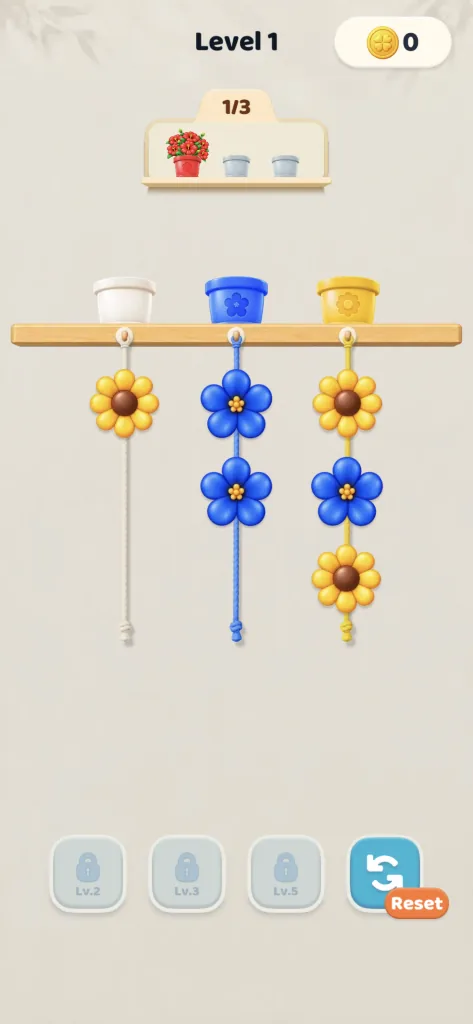
Click to load · Saves in browserSort Streak is a browser-based flower-sorting puzzle where you organize hanging blossoms by color until every pot on the upper shelf is in full bloom. Instead of pouring liquids or stacking plain blocks, each board suspends colorful flowers—such as sunflowers, blue blooms, and red hibiscus—along knotted ropes hanging beneath colored flower pots.
Playing Sort Streak feels calm, tactile, and methodical. Each rope acts as a flexible lane, and the game gives instant visual feedback while you drag: valid target ropes highlight with a green checkmark, while incompatible ropes show a red cross. When you group a complete set of matching flowers, they rise smoothly onto the wooden display shelf above the board and fill the next empty pot.
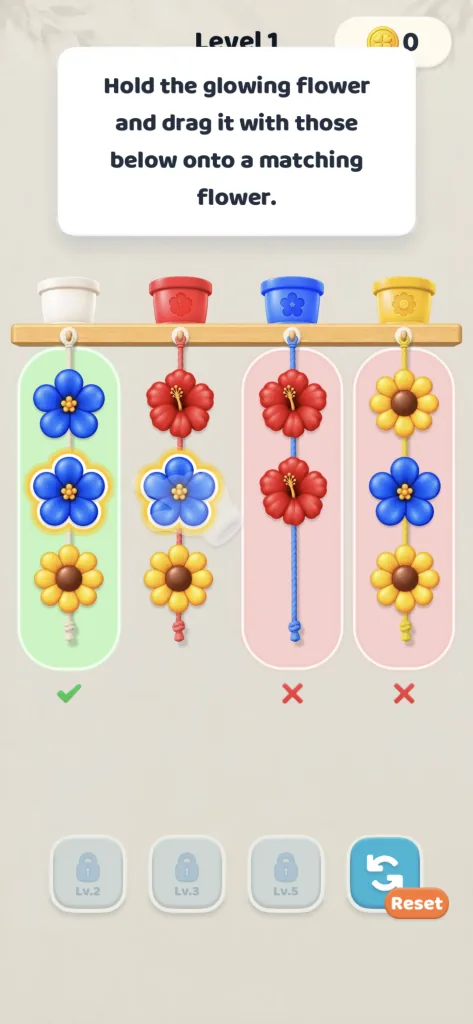
Your goal in Sort Streak is to group matching flowers together so every target pot on the upper shelf fills up. Once all pots for the level bloom, the stage is complete and you move on to the next garden layout.
Every cleared level in Sort Streak awards coins and unlocks new helper tools at fixed milestones. The Reset button is open from Level 1 so you can restart a tight layout immediately. Reaching Level 2 unlocks Undo to step back a move, Level 3 unlocks Hint to highlight a valid play, and Level 5 unlocks Extra Rope to add breathing room on multi-color boards. All tool refills in this browser edition are free with no video ads to wait through.
Yes, it plays smoothly on phones and tablets in mobile Chrome or Safari. The canvas uses a native 1080×2340 portrait ratio that fits upright mobile screens without awkward horizontal scrolling.
No download or app store install is needed. Clicking Play Sort Streak loads the game directly inside your web browser using WebAssembly and WebGL, and your browser caches the files locally so repeat visits open much faster.
Yes, it is completely free to play online here. You can play through the levels and refill unlocked tools like Undo, Hint, and Extra Rope directly in the browser without paywalls or video ad delays.
Yes, tap or click the Fullscreen button right next to the game window at any time. The flower board expands to fill your display cleanly and returns to normal view when you press Escape or exit fullscreen.
Yes, your current level, coins, tool inventory, and even mid-level rope positions save automatically inside browser storage. As long as you return in the same browser without clearing site data, your board picks up where you left off.
First give the initial load a few seconds while the engine and art pack finish downloading and decompressing. If the screen stays stuck, click Reload, verify that WebGL is enabled in an up-to-date browser (Chrome, Edge, Safari, or Firefox), and avoid strict private windows that block local browser storage.
Treat an empty rope in Sort Streak as your primary workspace. Before filling your last open lane, check whether the next move will immediately free another rope or complete a pot on the shelf.
Check the counter above the upper shelf and look for ropes that already hold two matching blooms. Completing a pot removes an entire color group from the hanging ropes and opens vertical space across the board.
Remember that lifting a higher flower in Sort Streak carries every bloom hanging below it. You can move a whole lower tail onto an empty rope specifically to expose the color sitting right above it.
If your opening moves tangle two colors on the same rope, tap Reset right away to replay the layout cleanly with zero penalty. Save Undo (Level 2), Hint (Level 3), and Extra Rope (Level 5) for deeper puzzles where you are only a few moves from finishing.
While holding a flower group, pause for a moment to see every rope lit up in green. Choosing the landing spot that exposes a useful underlying color prevents dead ends two turns later.
In Sort Streak, flowers hang vertically on ropes and dragging any flower lifts all the blooms hanging beneath it as a group. Combined with the wooden shelf of target pots and color-coded landing indicators, you plan around linked flower chains rather than moving only one single piece from the top.
Sort Streak waits for your click before downloading the WebAssembly engine and texture pack so the webpage itself opens almost instantly and does not spend mobile data until you decide to play. Once downloaded, your browser caches those files for fast return launches.
Reset is available right away on Level 1. Undo unlocks at Level 2, Hint unlocks at Level 3, and Extra Rope unlocks at Level 5 as you clear main stages.
No, Sort Streak stores your level and active board locally in each browser using localStorage and IndexedDB, with no account sign-in or cloud sync. Your progress stays on the device and browser where you play.
That notice appears when private browsing mode, strict cookie blocking, or full device storage prevents the page from writing local save files. You can still play immediately, though progress may reset after closing the tab.